An in-house hospitality companion that takes care of repeat front-desk questions, catches room issues while guests are still in-house, and lets staff update house notices themselves.
It doesn't replace the receptionist. It takes care of the constant questions about Wi-Fi passwords, checkout times, and tram tickets, gives guests an easy way to tell the desk when a shower is cold or a locker is broken, and lets on-duty staff change notices in thirty seconds without calling an IT person.
System Architecture & Operational Flow
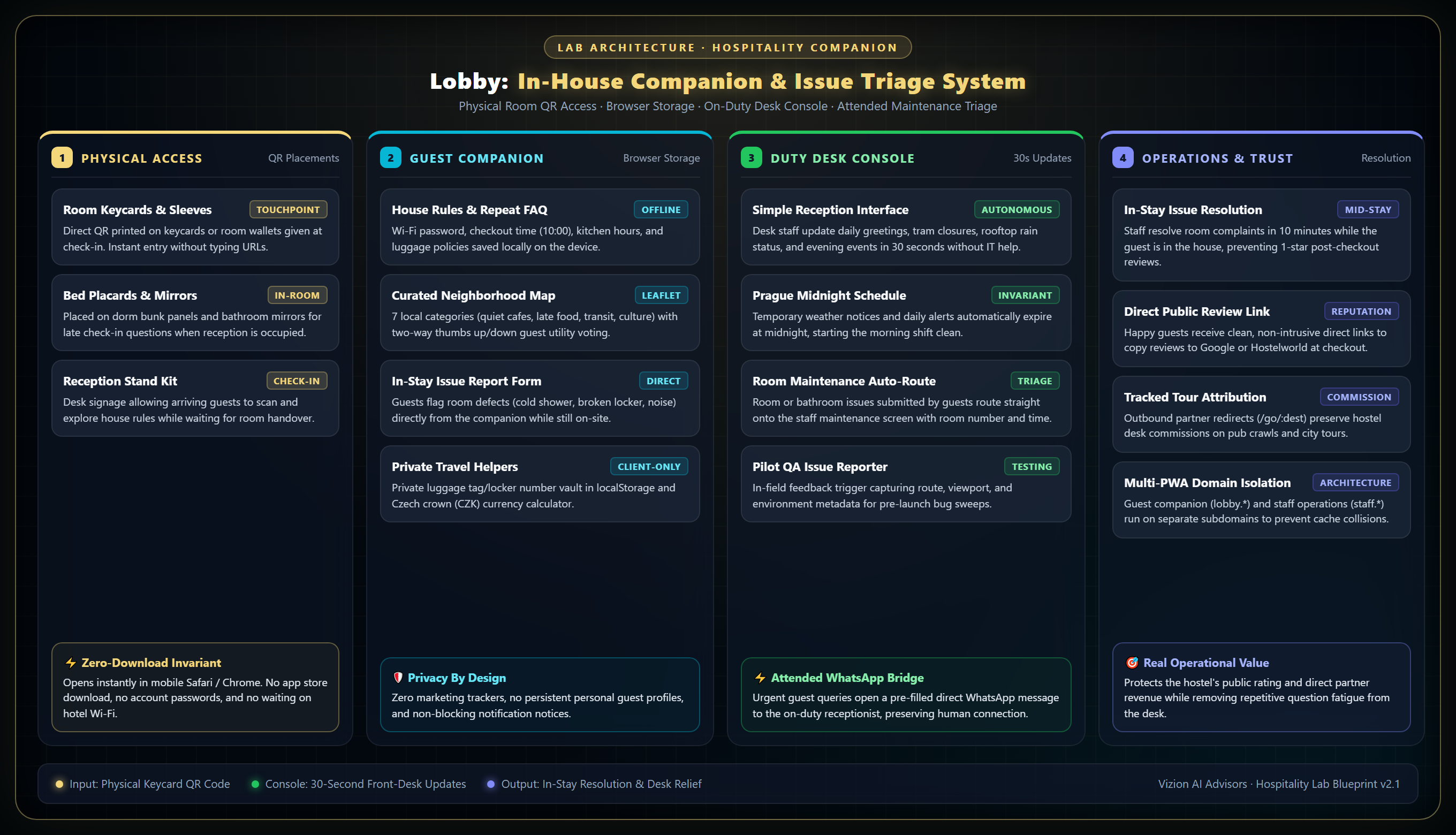
How it works: A QR code in the room opens the companion in the phone's browser. Guests find answers and message the desk about room issues. The front desk updates house notices and manages repairs from their own screen.
Interactive Demonstration
Orloj City Center Hostel
(Standalone backendless demo application)
The public demo runs on a fictional property—Orloj City Center Hostel. It lets you test both what the guest sees on their phone and how staff change notices from the desk, without touching live customer data.
No app store download or login is required. You can test the in-stay room issue report flow, browse the categorized neighborhood map, and open the staff console to simulate real-time property updates.
Built with local browser state and zero external database dependencies for secure, reliable demonstrations.
Fewer repeat questions at the desk
Receptionists spend hours answering the exact same questions: What is the Wi-Fi? When is checkout? How do I get to the airport? Can I leave my bags? Guests scan the code and get the answer immediately, leaving the desk free for a normal conversation.
Fixing room problems while the guest is still here
When a shower is cold, a reading light is dead, or a bunk squeaks, most guests don't walk down to complain. They suffer quietly and leave a bad review three days later. The companion gives them a simple way to message the desk so staff can fix it, swap the room, or buy them a drink before they leave.
The desk updates it in thirty seconds
When it starts raining and the rooftop bar has to close, the receptionist types it into their phone. It goes live on the companion immediately. No developer, no support ticket, no waiting on outside help.
The Operational Dilemma
Why hotel apps and paper signs fail in everyday hospitality.
Why Mobile Apps and Paper Signs Fail
Almost nobody downloads an app for a weekend hostel stay. If you ask a tired traveler arriving at 22:00 to search an app store, remember a password, and wait for a download just to find the front door night code, they won't do it.
Paper signs have the opposite problem: they get outdated fast. Kitchen hours shift, rooftop bars close for rain, event dates change, and laminated sheets get grimy. Within a month, the paper doesn't match reality, and guests walk up to reception to ask the exact same questions anyway.
A Web Page That Works Like an App
Lobby opens in the phone's regular browser from a QR code on the keycard, room door, or front desk. There is nothing to install and no account to create.
It saves the basic house rules, tram advice, and emergency numbers directly to the phone. If the guest steps outside or their data drops out, the information is still there.
The point is not to automate the business or hide behind technology. It is to handle the mechanical questions so the people working the shift can focus on actual hospitality.
Operational Specifications
How it works during a shift.
Built and tested in a 140-bed hostel in Prague 1 (The Clock Inn on Spálená Street) to handle the daily reality of front-desk shifts. Simple tools for the on-duty team, working beside existing front-desk tools without complex software setups.
A simple update screen for reception
Receptionists have no time to fiddle with complicated software during check-in rush. The staff screen has simple text boxes and switches. Anyone working the desk can post a morning note, announce tonight's pub crawl, or flag that tram 22 is diverted on their very first shift.
Announcements that disappear at midnight
If the desk posts that the rooftop terrace is closed tonight because of rain, nobody has to remember to delete it tomorrow morning. Temporary alerts automatically clear at Prague midnight so the morning shift starts clean.
Room repairs go straight to the maintenance list
When a guest reports a leaking shower or a broken locker, it lands on the staff maintenance screen with the room number and time. Staff can see what is open, fix it, and mark it done before the next check-in.
A neighborhood map that guests actually help curate
A local map showing what travelers actually ask for: quiet cafes with good Wi-Fi, late-night food, pharmacies, and safe transit. Guests can tap a quick thumbs-up or thumbs-down on recommendations, or suggest new spots they found.
Practical tools for real travel
Practical helpers built for hostel guests: a private spot on the phone to jot down their luggage tag or locker code so they do not lose it in town, a Czech crown currency converter, and a clear guide to buying Prague public transit tickets.
No tracking or personal data
No marketing cookies, no app store tracking, and no personal guest profiles stored on our servers. The companion opens, gives the guest what they need, and stays out of the way.
Where earlier versions fell short and what we learned.
We test systems under real operating conditions. When an idea fails in the field, we document exactly why and rebuild the architecture.
The Chatbot That Hallucinated Breakfast
Why open-ended conversational models create operational chaos
We initially tested an open-ended conversational AI where guests could type any question in a chat box.
The model started making things up. It told guests the hostel served a hot buffet breakfast (the property only had a guest fridge and coffee), promised late checkouts that reception could not honor, and gave conflicting quiet hours.
Open chat boxes are a liability for hotel operations. When guests have a question, they do not want a conversation; they want a clear, verified fact. We removed the open chat box and replaced it with verified question cards. If an automated assistant is used, it is locked to strict, pre-approved property facts with hard limits on message length.
The Follow-Up Email That Arrives Too Late
Why waiting until after checkout guarantees negative reviews
Most hotel software sends an automated email 24 hours after checkout asking how the stay went.
By the time a guest reads that email at the airport or back home, the stay is already ruined. If their shower was freezing or their dorm was loud, an email apologizing after the fact is useless. They do not want an apology; they go to Google or Hostelworld to warn other travelers.
You can only fix a bad stay while the guest is still standing in the building. We put an issue report button right in the companion. If a guest has a problem, they tell the desk immediately. Staff get a chance to fix the shower, move their bed, or buy them a beer before that frustration turns into a one-star review.
Why Travelers Refuse to Install Hotel Apps
Why convenience and browser speed beat native app store features
Early on, we thought about building native iPhone and Android apps so we could send push notifications.
When we watched real guests check in after a long flight with heavy backpacks, nobody wanted to download an app. Asking someone to open an app store, enter an Apple ID password, and wait on public Wi-Fi just to find out when the kitchen closes is annoying.
Convenience matters more than fancy features. We rebuilt the companion to run in the phone regular browser. A guest points their camera at the QR code on their keycard, and it opens in two seconds in Safari or Chrome. Nothing to install, no passwords, and it saves the rules locally so it still works if their connection drops.
When Staff Screens and Guest Caches Collided
Why running staff tools and guest guides on one address fails
In our first setup, we put the guest companion and the staff administration screen on the exact same website address so they could share logins.
Modern web browsers save web pages aggressively so they open fast offline. Because both tools lived on the same address, the browser got confused. Staff editing notices were seeing old cached guest pages, and guest phones were trying to load staff tools that asked for passwords.
Guest pages and staff tools must live on completely separate addresses. We split them: the guest companion runs on its own clean address (lobby.property.com), and the staff screen runs on an isolated address (staff.property.com). That completely separates the offline caching from the staff login so they never clash.
Consulting & Deployment
Built for independent hostels and boutique hotels.
Lobby is available as an elevated proof-of-work in Labs, with working code and architecture running in production. If your property needs a reliable hospitality companion, front-desk relief, or structured staff tooling, we can configure a baseline deployment tailored to your house rules and brand.