Knowledge Pipeline
Companies rarely have a shortage of recorded material. They have a retrieval problem. The Knowledge Pipeline turns unorganized video, audio, and meeting archives into structured, source-grounded reference libraries that teams can actually query and verify.
System Architecture & Flow
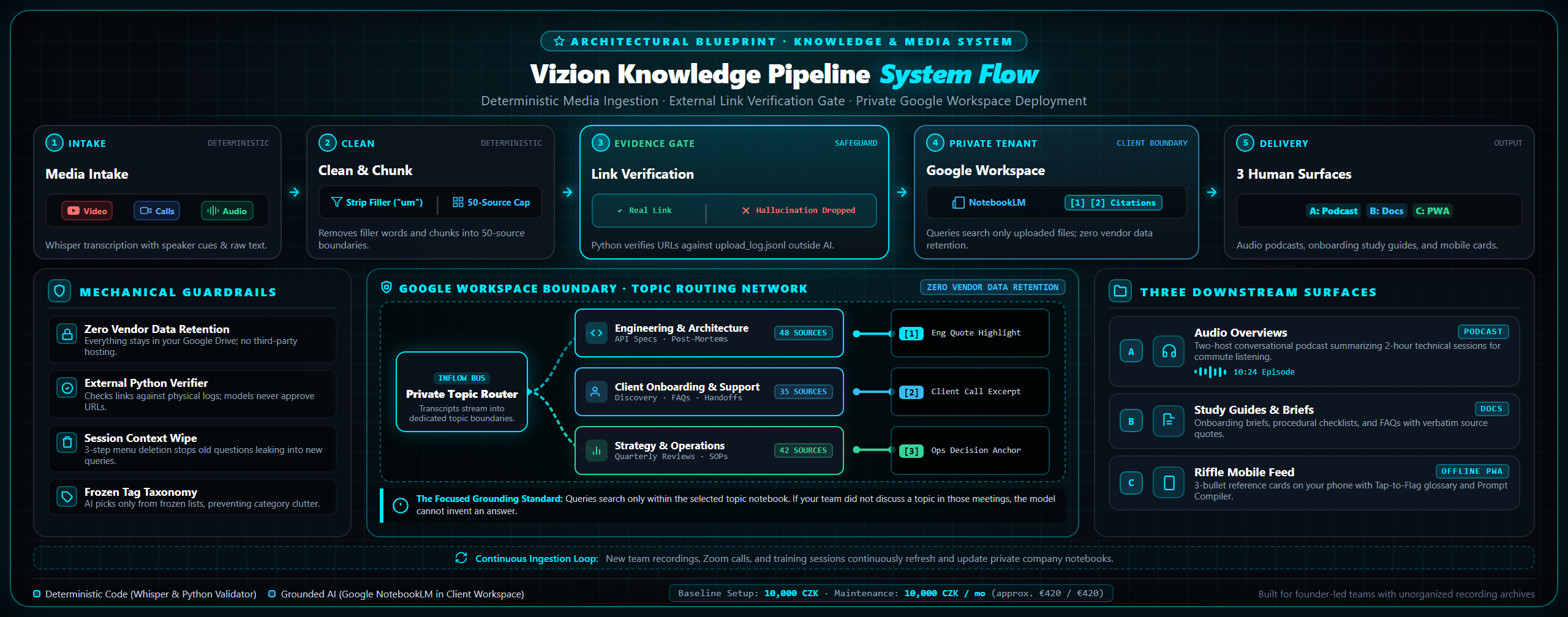
Starting Baseline Setup & Maintenance
Starting at 10,000 CZK setup · 10,000 CZK / mo
(approx. €420 setup · €420 / mo baseline)
The 10,000 CZK baseline setup covers reviewing your existing audio and video archives, cleaning and structuring transcripts, grouping them by topic, and configuring your first private Google NotebookLM workspace with grounded search and citation badges.
Ongoing monthly maintenance (from 10,000 CZK / mo) covers reviewing new recordings your team produces, cleaning transcripts of technical terms, and adding them to your notebooks so search stays up to date.
For teams that want to turn archives into training materials, expanded tiers cover producing custom NotebookLM Studio assets: two-host Audio Overview podcasts, employee onboarding study guides, and briefing sheets.
Your data never leaves your control: everything is loaded into your own Google accounts. We clarify the exact scope during discovery before any commitment.
See Riffle, our public mobile showcase built from over 500 technical videos, organized into searchable reference cards with direct source links.
The Real Problem
Most company video and audio sits in folders completely untouched. Team meetings, client calls, webinars, and training sessions accumulate constantly, but nobody has the time to watch an hour of video to find a five-minute practical answer.
The Grounding Standard
Generic AI tools summarize meetings by guessing what mattered. We anchor every note to the original recording and transcript. You see the exact discussion in its original context, instead of trusting an unverified chatbot summary.
Your Data Stays Yours
We do not host your files or store your recordings on proprietary servers. Everything goes directly into your own Google Workspace and NotebookLM accounts. We only see what you share with us during the project, and you keep all the files.
Challenging Our Own Claims
What we hoped for, what we tested, and what actually happened.
It is easy to make an AI demo look impressive in a five-minute video. It is much harder to make it work reliably across 500 hours of real recordings. Here are four times our own assumptions broke down, and what we changed to fix them.
The test said "Passed." The answers were completely wrong.
Why our automated test reported a 90% success rate while returning the exact same answer across eight questions.
The uncomfortable question: Do you even need our tool, or can ChatGPT do this alone?
Testing whether a leading AI model with no access to our recordings could answer just as well.
The browser reload that secretly corrupted new questions.
Why refreshing the page failed to clear workspace memory, and how old chats leaked into new questions.
What happened when we let an AI organize video tags on its own.
Why smaller AI models should only propose draft ideas, and why automation should never approve its own work.
Why This Exists
Most business teams accumulate hours of video and audio every month: onboarding sessions, customer interviews, weekly strategy meetings, and recorded software walkthroughs. Once recorded, those files sit in cloud folders because nobody has the hours required to listen through them again.
Typical AI transcription tools generate a wall of text, but reading through a 50-page transcript is almost as slow as watching the video. Generic chatbot summarizers gloss over technical nuances and smooth out the specific steps you actually needed.
The Knowledge Pipeline is built to make that accumulated knowledge reachable. By organizing recordings into clear thematic collections and loading them into Google NotebookLM, team members can ask natural questions and get grounded answers with clickable citation badges pointing to the exact transcript passage.
For teams that want more than basic search, it opens up NotebookLM's studio tools: you can turn a five-hour training playlist into a 10-minute conversational audio overview (podcast), an onboarding study guide, or an executive briefing document for your team.
Best of all, you own the infrastructure. We do not store your recordings on our servers or charge you a per-seat software subscription. Everything sits inside your own Google account, with access strictly controlled by you.
The Reality
This is not about generating generic video recaps or automated social clips.
It is a structured way to turn your existing video and audio assets into a verified, searchable internal reference tool that saves your team time.
What it actually does
- Pulling transcripts from your video, audio, or playlist archives and stripping conversational filler
- Labeling each recording with session dates, titles, and direct links back to the original source files
- Grouping transcripts by topic so related team discussions stay together instead of getting lost in folders
- Configuring your private Google NotebookLM workspace so team queries return answers with clickable citation badges
- For larger setups, generating NotebookLM Studio assets: two-host Audio Overview podcasts, onboarding study guides, and briefing sheets
- Zero vendor lock-in: everything runs inside your own Google accounts without recurring third-party software subscriptions
What a client project can include
- Reviewing your existing recording archives and assessing audio clarity for transcription
- Extracting and cleaning transcripts to strip verbal filler and correct technical terms
- Organizing recordings into clear topic collections suited to your team workflows
- Setting up your Google NotebookLM workspace and testing queries against real team questions
- Optional studio tier: producing custom Audio Overviews (two-host podcast discussions) and employee onboarding study guides
- Full handoff and documentation so your team can add future recordings independently
Live Demonstration
See the pipeline in action.
We tested this pipeline against a public corpus of over 500 technical videos, compiling the results into Riffle: a mobile card feed with over 580 curated reference cards.
Working Proof
- 588+ real cards across 6 months of technical releases
- Direct links back to original videos and source transcripts
- Mobile-first snap feed designed for intent capture and prompt creation